Runway Ruby and Topaz Hyperion 2.5 arrived within days of each other in August 2026, and they do the same job: take standard range video and give you HDR back. It is tempting to look for a philosophical split between them, but there isn't much of one, since both makers describe an automatic pass that extends brightness and colour into HDR range while keeping the picture intact, and neither claims to redraw your footage. What separates them is more useful than a philosophy: they accept different footage, write different files, and take different amounts of it at a time. Both run on Morphic, so this is a question of which one your material suits.
Runway Ruby vs Hyperion 2.5: the specs
Each maker's own published figures. "None published" means the maker has not stated a limit, which is not the same as there being none.
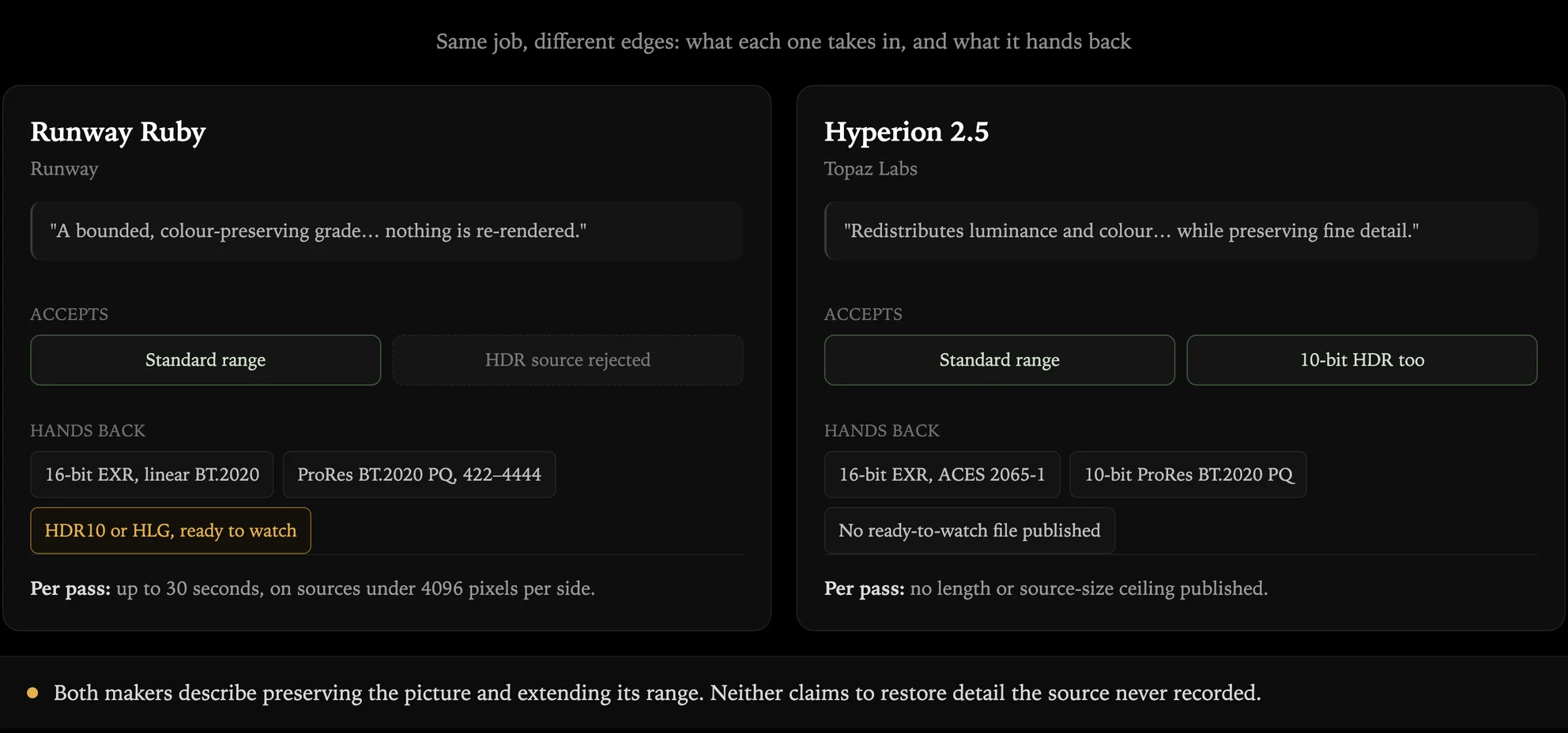
| Feature | Runway Ruby | Hyperion 2.5 |
|---|---|---|
| Maker | Runway | Topaz Labs |
| Stated operation | A bounded, colour-preserving grade, with nothing re-rendered | Redistributes luminance and colour while preserving fine detail |
| HDR source footage | Rejected, standard range in only | Accepts 8-bit SDR and 10-bit HDR |
| Highest bit depth | 16-bit float EXR | 16-bit half-float EXR |
| EXR colour space | Linear BT.2020 light | ACES 2065-1 |
| ProRes master | BT.2020 PQ, 422 to 4444 | 10-bit BT.2020 PQ |
| Ready-to-watch file | 10-bit HEVC, HDR10 or HLG | Not published for this model |
| Clip length per pass | Up to 30s | None published |
| Source size ceiling | Under 4096px per side | None published |
| Settings to balance | None | None |
| On Morphic | Available now | Available now |
What Runway and Topaz each claim
Worth reading side by side, because the two descriptions are closer than the marketing around them suggests.
Runway says the conversion is "a bounded, color-preserving grade" in which "nothing is re-rendered", and that it "preserves the source's own pixels and audio".
Topaz says Hyperion 2.5 "automatically redistributes luminance and color information across highlights, midtones, and shadows while preserving fine detail", and "expands the available color and luminance range".
Both are describing an automatic remap into a larger container, and both use the word preserving. Neither claims to invent detail that the source never recorded, and neither can: values clipped when a file was first written are absent from it, so on badly blown-out footage both models have little to work with and results get weaker rather than more imaginative.
So the honest summary is that these two are close on what they do to a frame, and genuinely different on everything around it.
Where Ruby and Hyperion differ
What they will take. This is the sharpest split. Hyperion accepts 8-bit standard range and 10-bit HDR sources, so a clip that already carries HDR information can still be pushed to a higher-precision format. Ruby rejects anything already tagged as HDR and converts standard range only. If your material is a mix, Hyperion handles more of it without triage.
The colour space on the way out. Both write 16-bit EXR frames, but not in the same space. Ruby's EXR carries linear BT.2020 light; Hyperion's targets ACES 2065-1. Which one is right depends entirely on what the pipeline receiving it expects, and that is usually decided for you.
Whether you get a file people can just watch. Ruby publishes a finished 10-bit HEVC in HDR10 or HLG alongside its masters, so a deliverable comes straight out of the conversion. Topaz does not publish an equivalent ready-to-watch output for this model, so plan on a finishing step.
How much goes through at once. Ruby takes up to 30 seconds per pass on sources under 4096 pixels per side. Topaz publishes no length or source-size ceiling for Hyperion 2.5, which makes longer material simpler to handle, though an unpublished limit is not a guaranteed absence of one.
Which should you use?
Choose Runway Ruby if
- You want a watchable file at the end. HDR10 or HLG comes out of the conversion, so a deliverable does not need a separate finishing pass.
- Your pipeline wants linear BT.2020. That is what its EXR frames carry, and matching the receiving pipeline saves a conversion.
- Your material is short and standard range. Inside 30 seconds and under 4096 pixels per side, the limits never come up.
Choose Hyperion 2.5 if
- Your sources are mixed, or already HDR. It is the one that will take 10-bit HDR footage as well as standard range, so nothing needs sorting first.
- You are working long or large. With no published length or size ceiling, long material does not have to be split into passes.
- You want ACES on the way out. Its EXR path targets ACES 2065-1, which some visual effects pipelines expect by default.
If you are still unsure
Convert one representative shot both ways and look at them on an HDR screen. It costs one pass each and settles the question for the whole batch, because the answer is a property of your footage rather than of the models.
Run both conversions on Morphic
You do not have to commit to one. Morphic is a complete AI video production workspace: multi-model generation on a single roster, AI storyboarding on a shared Canvas, and a built-in timeline editor, with an agentic Copilot running the work between them.
- Finish before you convert. Generate, upscale and cut in one place, then convert the finished master rather than processing footage you are still going to change.
- Try both on one shot. Send the same clip to each model and compare the results before committing a batch.
Runway Ruby and Hyperion 2.5 are both on the roster, so either conversion is a sentence to Copilot rather than an export, an upload and a wait.
FAQs
Less than the marketing suggests on what they do to a frame, and quite a lot around it. Both describe an automatic pass that extends brightness and colour into HDR range while preserving the picture.
The differences that matter are practical: Hyperion accepts 10-bit HDR footage as well as standard range, while Ruby takes standard range only. Ruby publishes a ready-to-watch HDR10 or HLG file; Topaz does not for this model. Ruby caps a pass at 30 seconds; Topaz publishes no ceiling.
Either. Generated clips are usually standard range and short, which sits inside Ruby's limits and gets you a watchable HDR file in one step. Hyperion is the better fit when the batch is long, or when some of it is already HDR. Both makers specifically describe converting generated video to professional formats.
Not really, in either case. Values clipped when the file was written are absent from it, and neither maker claims to invent replacements.
Both describe redistributing what survived into a wider range. That gives highlights which still hold detail room to separate, and gives a grade more to work with. On heavily blown material both get weaker results rather than better ones.
No. Neither exposes exposure, saturation or threshold controls, so there is nothing to balance shot by shot. Topaz states the conversion runs "without requiring manual adjustment controls", and Ruby's conversion takes no creative parameters at all. The only decision is which output file you want.
Both reach 16-bit EXR for compositing and both write a ProRes master in BT.2020 PQ, so a finishing pipeline is served either way. They differ in the details.
Ruby's EXR carries linear BT.2020 light and it adds a 10-bit HEVC file in HDR10 or HLG for delivery. Hyperion's EXR targets ACES 2065-1. Topaz's published format list for this model is narrower than what its desktop app offers, so check the route you are using.
Yes. Runway Ruby and Hyperion 2.5 are both on Morphic's roster: ask Copilot to convert a clip to HDR and name the model, or pick it from the model library and attach the video.
Because both sit alongside the generation, edit and upscale models, you can generate a clip, finish it on the timeline and convert it without leaving the workspace, or send one shot through each and compare.