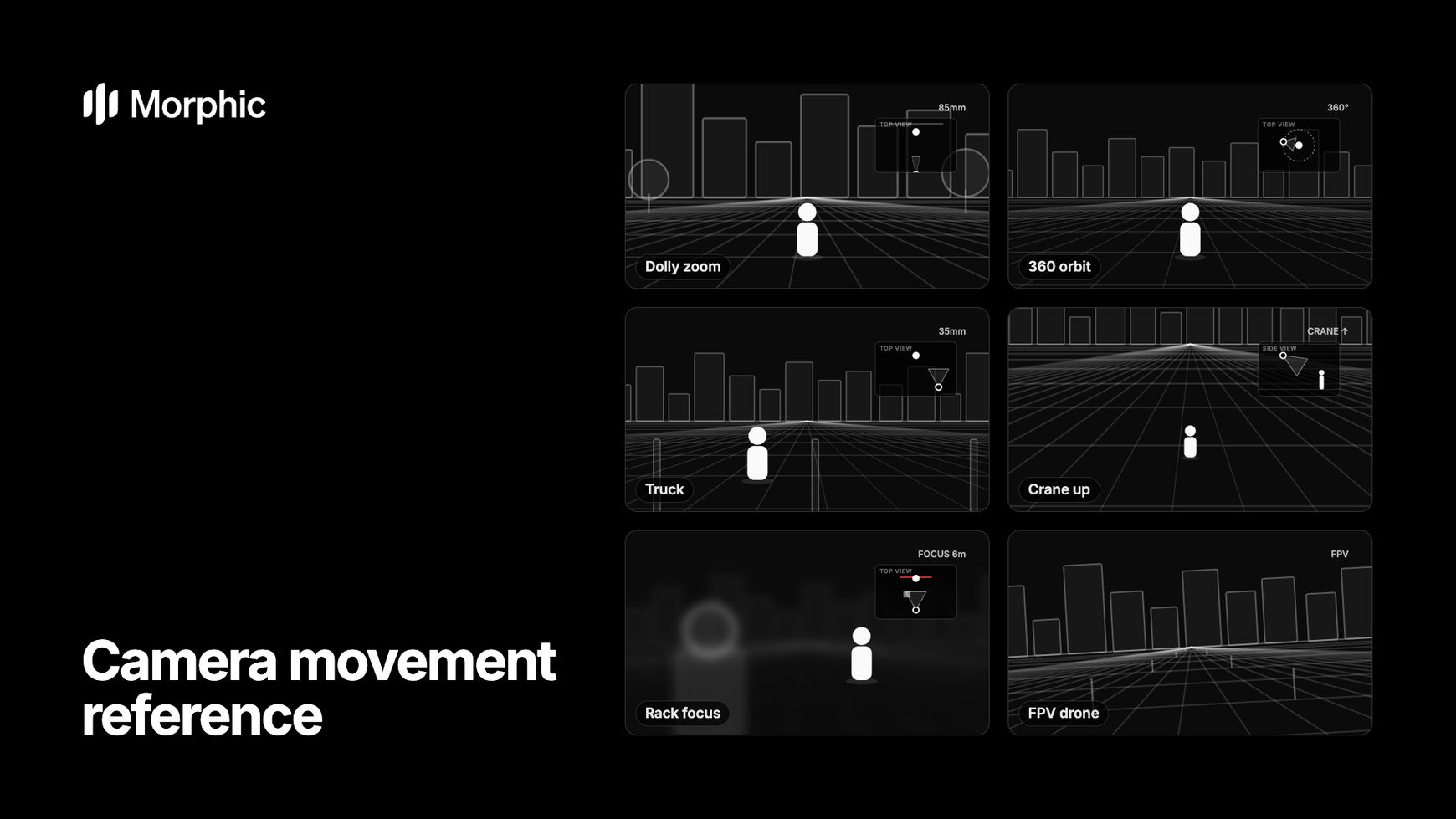
Camera movements: pan, tilt, dolly, truck, crane and orbit
These are the moves where the camera itself turns or travels. A pan or tilt rotates the camera on the spot, while a dolly, truck, pedestal or crane carries the whole camera through space. Watch the layers in each diagram: when near and far things slide at different speeds, the camera is travelling.
A pan turns the camera left or right on a fixed point, like turning your head. Near and far things slide together, with no change in depth.
Reveal a wide place or follow action across it.
A tilt turns the camera up or down on a fixed point, like nodding. The camera stays where it is and only its angle changes.
Show height, or build from feet to face.
Roll
Barrel rollA roll rotates the camera around the lens axis, so the horizon spins in the frame. A full turn reads as a barrel roll.
Disorientation, dream states, a world turning over.
Dolly in
Push inA dolly in moves the whole camera forward toward the subject. The subject grows faster than the background, so the space keeps its depth.
Pull the viewer into a thought or a decision.
Dolly out
Pull outA dolly out moves the whole camera backward, away from the subject. The world opens up around the subject as it gets smaller in frame.
Isolation, endings, revealing where someone really is.
Truck
Crab, lateral moveA truck slides the whole camera sideways, parallel to the scene. Near things pass faster than far ones, which is the parallax that tells it apart from a pan.
Glide past a scene with real depth and parallax.
Pedestal
Ped up, ped downA pedestal raises or lowers the whole camera straight up or down without tilting it. The horizon holds its place while the view rises over or sinks below the subject.
Rise over an obstacle, or match a subject standing up.
Crane up
Boom up, jib upA crane up lifts the camera on an arm, usually tilting down as it climbs. The horizon drops away and the subject shrinks into a wider view of the place.
Open or close a scene by showing its scale.
Crane down
Boom down, jib downA crane down lowers the camera from high above into the scene, ending close to eye level. It is the crane up in reverse.
Arrive in a place and land on the person who matters.
Arc
Half orbitAn arc moves the camera part-way around the subject while keeping it centred. The background swings past behind it, revealing the subject from a new side.
Hero beats and reveals; the moment feels suspended.
360 orbit
Full orbitA 360 orbit carries the camera all the way around the subject in a full circle, keeping it centred while the world turns behind it.
Products, dancers, a character who owns the frame.
Tracking shot
Follow shotA tracking shot moves the camera alongside a moving subject at the same speed. The subject holds its place in frame while the world streams past.
Walks, chases and journeys the viewer rides along on.
Leading shot
Lead shotA leading shot moves the camera backward in front of a subject walking toward it. The subject stays the same size as the road slides away behind the camera.
Walk-and-talks, and faces with somewhere to be.
Lens moves: zoom, crash zoom, dolly zoom and rack focus
Here the camera body stays where it is and the lens changes what you see. A zoom enlarges the whole picture evenly, so nothing shifts in depth, and that flat look is how you tell it from a dolly. Focus moves steer attention without moving the frame at all.
A zoom in narrows the lens so the picture enlarges, while the camera stays put. Everything grows evenly, with no change in depth or perspective.
Quick emphasis with a documentary or 1970s feel.
A zoom out widens the lens so more of the scene fits in frame, while the camera stays put. Everything shrinks evenly together.
A flat, observational reveal of the wider scene.
Crash zoom
Snap zoomA crash zoom is an abrupt, very fast zoom onto one detail, landing almost instantly. It is also called a snap zoom.
Comic beats, shocks and punchlines.
Dolly zoom
Zolly, contra-zoomA dolly zoom moves the camera one way while zooming the lens the other. The subject holds its size while the background stretches away or rushes in.
Shock and dread, saved for the turning point.
Rack focus
Focus pullA rack focus shifts focus from one distance to another while the camera holds still, so the sharp subject goes soft and the soft one comes sharp.
Move attention without a cut.
Camera rigs and angles: static, handheld, gimbal, drone and POV
The rig sets the feel of a shot as much as the move does. A tripod reads as calm, handheld as present and urgent, a gimbal as smooth and floating. Angles such as Dutch and overhead change how the viewer relates to the subject.
Static shot
Locked offA static shot is filmed from a camera that does not move at all, usually on a tripod. Only the action inside the frame changes.
Let the action carry the frame.
A handheld shot is filmed with the camera held by an operator, so it carries a slight, natural shake that moves with their breathing and steps.
Realism, urgency, documentary closeness.
Gimbal shot
Stabilised floatA gimbal shot uses a motorised stabiliser to glide smoothly through space with no shake, like a floating, weightless walk.
Dreamy walkthroughs and long, floating takes.
Dutch angle
Canted angleA Dutch angle tilts the camera sideways so the horizon sits on a slant. It is also called a canted angle.
Unease; steep angles read as chaos.
POV shot
First personA POV shot shows the scene from a character's own eyes, so the viewer sees exactly what they see, often with their hands in frame.
Put the viewer inside the character.
Overhead shot
Top-down, bird's-eyeAn overhead shot looks straight down at the scene from directly above, turning streets, crowds and people into flat shapes and patterns.
Patterns, maps, and a subject made small.
Aerial flyover
Drone shotAn aerial flyover is filmed from high above, usually by a drone, gliding forward over the land with the horizon high in frame.
Establish a place and its size.
An FPV drone shot is a fast first-person flight that dives, banks and weaves close past objects, flown by a pilot wearing goggles.
High-energy openers, chases and reveals.
Speed and time effects: slow motion, speed ramp and time-lapse
These change how fast the moment plays back rather than where the camera goes. Name the effect and the moment it applies to, such as the top of a jump, so the model knows where to stretch or compress time.
Slow motion plays action back slower than real time, by filming at a high frame rate. A jump or a splash stretches into a long, readable moment.
Stretch the one moment you want felt.
Speed ramp
A speed ramp changes playback speed within one shot, usually from fast into slow motion at the key moment and back to fast.
Punctuate the peak of a jump, turn or hit.
A time-lapse captures a scene from a fixed camera over hours and plays it back in seconds, so suns cross the sky and clouds race.
Show time passing: light, weather, crowds.
Hyperlapse
A hyperlapse is a time-lapse in which the camera also travels, moving forward in steps so a journey or a city rushes past.
Rush through a city or a journey.
A freeze frame stops the picture dead on a single moment and holds it, while the shot would otherwise keep moving.
Land a punchline or end on a cliffhanger.
Time-slice
Frozen-moment orbitA time-slice freezes a single moment while the camera keeps moving around it, so a frozen subject is seen from several angles.
Show one instant from every side.
Reverse motion
Reverse motion plays the action backward, so falling things rise, broken things reassemble and smoke flows back into its source.
Undoing, rewinding, the uncanny.
Video transitions: cut, match cut, whip pan, dissolve, J-cut and L-cut
Transitions decide how one shot hands over to the next. Some can be generated inside a single clip, like a whip pan or a morph. Others, such as J-cuts and L-cuts, are edits you make while assembling clips in Compose.
Cut
Hard cutA cut is the instant change from one shot to the next with no effect in between. It is the most common transition in film.
The default; invisible when it follows the action.
A jump cut joins two moments of the same shot from the same framing, so time skips and the subject seems to jump to a new position.
Time passing, restlessness, vlog energy.
A match cut joins two different scenes through a shared shape, colour or movement in the same place in frame, such as a coin that becomes the moon.
Link two places or two ideas.
Whip pan
Swish panA whip pan swings the camera so fast that the picture smears into motion blur, and the next shot emerges from the blur. It is also called a swish pan.
Energy, comic timing, two places in one move.
Cross dissolve
A cross dissolve fades the outgoing shot out while the incoming one fades in, so for a moment both images overlap.
Memories, dreams, gentle time passing.
Fade to black
A fade to black dims the picture to complete black before the next shot fades back in, marking a pause or the end of a chapter.
End a chapter, mark a big jump in time.
Wipe
A wipe sweeps a line or shape across the frame, revealing the next shot behind it as it travels.
Clean, obvious, playful scene changes.
Smash cut
A smash cut jumps without warning from a quiet, calm moment straight into a loud or intense one.
Shock, comedy and contrast.
Morph
A morph transforms one shape into another in a continuous flow, so one subject becomes the next without a cut.
Transformation, and seamless AI-native transitions.
J-cut
A J-cut starts the sound of the next shot before its picture appears, so you hear the new scene before you see it.
Pull the audience forward into the next scene.
L-cut
An L-cut lets the sound of the previous shot keep playing after the picture has cut, so a line or a sound carries over the new image.
Linger on a line; the standard dialogue cut.