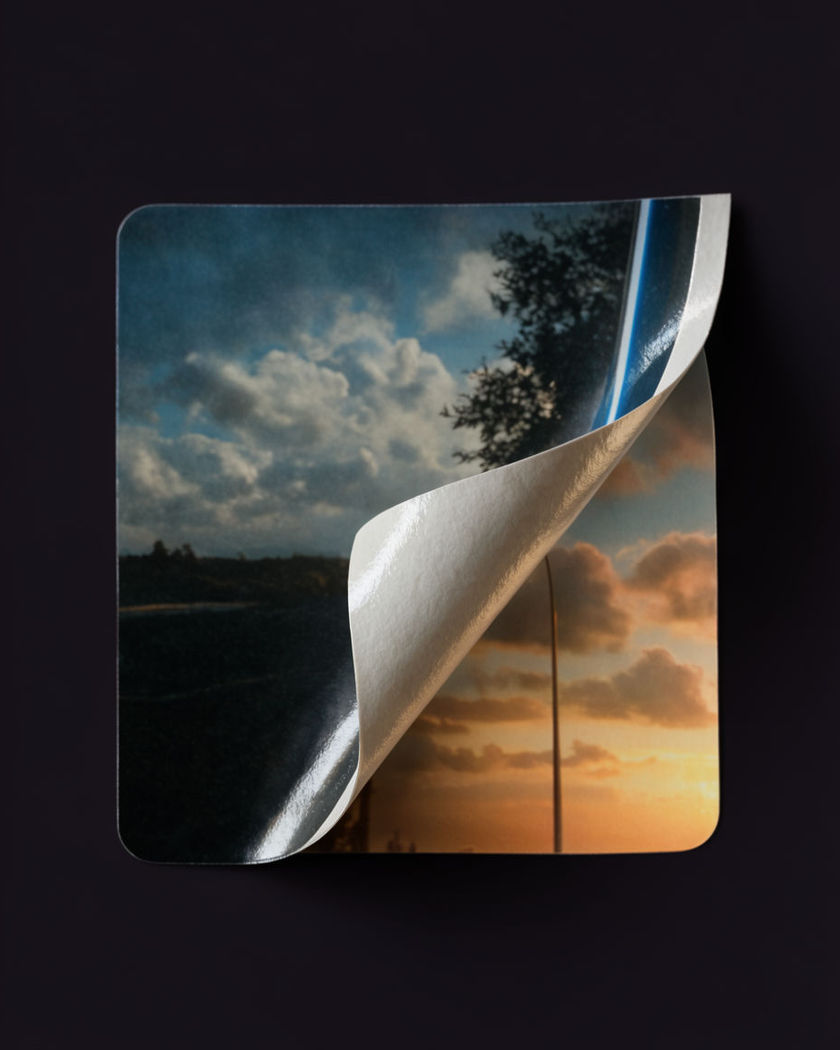
Paper Peel Off Effect

A printed paper layer curls up from one corner and peels away to reveal a different look underneath, generated as a single continuous reveal.

A paper sticker layer curling up from one corner, revealing a different image underneath

Paper peel off effect examples

Poster wall peel

Use this prompt

A wide shot of a poster on a wall peeling away to reveal a live portrait. a wide shot of a printed poster portrait mounted on a brick wall, the bottom edge peeling up and away in a long continuous curl to reveal a live, photoreal version of the same face behind it, natural daylight, documentary framing

Studio product-style peel

Use this prompt

On a clean studio set, a printed layer peels back in a graphic, deliberate arc. a wide clean studio shot on a plain backdrop, a subject's printed paper likeness peeling back in a smooth graphic arc from one side to the other, revealing the real subject beneath, bright even studio light, minimal and precise

Two-layer style swap

Use this prompt

A printed illustrated layer peels back to reveal a photoreal portrait beneath. a portrait styled as a flat printed illustration, the illustrated paper layer peeling back from one side in a slow curl to reveal a fully photoreal version of the same face underneath, soft even light, the transition line sharp and paper-thin

Curling strip reveal

Use this prompt

A narrow vertical strip of paper curls off, exposing a sliver of skin beneath. a portrait with a narrow vertical strip peeling off from forehead to chin like a bandage, the strip curling forward in slow motion and exposing a clean sliver of the real face beneath while the rest of the print stays flat, warm even light

Corner curl reveal

Use this prompt

A sticker corner lifts and the peel spreads across the face to reveal skin. a close portrait printed like a matte paper sticker, the bottom corner lifting and curling upward, the peel spreading diagonally across the printed face and revealing the real textured skin underneath, warm raking side light, slow deliberate motion

Torn edge peel

Use this prompt

A rough torn edge lifts unevenly, tearing away in small pieces as it goes. a close portrait printed on textured paper with a rough torn edge starting at the temple, the paper lifting unevenly and tearing away in small pieces as the peel progresses across the face, dramatic side light, gritty texture

Weathered torn peel outdoors

Use this prompt

A worn, weathered print tears away unevenly in an outdoor setting. a wide outdoor shot of a weathered printed portrait on a wooden fence, the paper torn and lifting unevenly in the breeze, small pieces tearing away to reveal the real scene behind it, overcast light, textured and worn

Full sheet lift-off

Use this prompt

The entire printed sheet lifts away from the face in one continuous curl. a portrait printed as a full paper sheet over a face, the whole sheet lifting away from the chin upward in one continuous curling motion like a poster being peeled off a wall, revealing the real face beneath, studio light, clean and graphic

Illustrated to real style reveal

Use this prompt

A wide scene where an illustrated print peels away to reveal photoreal detail. a wide shot of a person standing against a plain wall rendered as a flat illustrated print, the illustration peeling back from the edges inward in slow motion to reveal a fully photoreal version underneath, soft daylight, clean transition

Colour-to-mono peel

Use this prompt

A colour print peels back to reveal a monochrome portrait underneath. a vivid colour portrait printed as a paper sticker, the top corner lifting and the peel spreading across the frame to reveal a stark monochrome version of the same portrait underneath, single hard key light, striking contrast

Generate your own paper peel off effect

Pick a starting point, edit anything you like, then generate it in Morphic.

Generate

Simple pricing

Get started for free today, with the option to upgrade or cancel anytime.

Basic

$19/ month
billed as $0 per year

2400 monthly credits

1 user only

All models

Workflows

Standard

$24/ month
billed as $0 per year

3625 monthly credits

1 user only

All models

Workflows

Pro

$45/ month
billed as $0 per year

6350 shared monthly credits

1 user

+ up to 4 more at extra cost

All models

Workflows

Max

$170/ month
billed as $0 per year

24650 shared monthly credits

1 user

+ up to 9 more at extra cost

All models

Workflows

Enterprise

For higher limits

Custom

pricing and billing terms

High-volume credits
Custom seat limits
All models
Workflows
Pricing Gradient

Free

For playing around

$0

forever free

Up to 20 credits
1 user only
Limited models
Workflows

FAQs

Where can I make AI Paper Peel Off Effect videos with AI?
You can create AI Paper Peel Off Effect videos directly in your browser on Morphic. Start from your own image with the Image to Video tool, describe the peel, and Morphic generates the reveal. No layered compositing needed.
What kinds of shots work best for a paper peel off effect video?
A clear, well lit portrait or product shot against a simple background works best. A single continuous peel direction, from one corner, one edge, or a full sheet, reads more convincingly than several peels happening at once.
How do I write a good prompt for a paper peel off effect video?
Name what the printed layer looks like, where the peel begins, and what it reveals underneath. Add the light and the speed of the curl. The clearer the before and after, the more convincing the peel Morphic returns.
Can I use my own photo, and does the face stay consistent?
Yes. Upload your image and, where the look needs it, a reference sheet to hold the face steady across the printed layer and the reveal underneath, so both versions read as the same person.
Do I need video editing experience to make this video?
No. Morphic runs in your browser and you direct it with plain-language prompts. If you can describe the peel and the reveal, you can produce the video. The prompts on this page are written so anyone can paste and run them.
What can I use an AI Paper Peel Off Effect video for?
They work well as striking art, product reveal, and before-and-after style social content. Generate the shot, finish the edit with music on the timeline, then export the size each platform needs.